


Looking for a portable laser engraver Canada buyers can use for custom metal products, business branding or personalised gifts? A portable laser engraver can make it easier to mark items that are awkward to position under a fixed machine, while a handheld fiber laser marking machine offers flexibility for certain on-site and workshop jobs.
Before choosing a portable metal laser engraver, consider the materials you plan to mark, the size of your designs, safety requirements and how you will use the equipment. If you are comparing a handheld laser marking machine Canada businesses can use for custom work, this guide explains the key features and includes a Monport option to consider when shopping for a fiber laser engraver Canada customers can access.
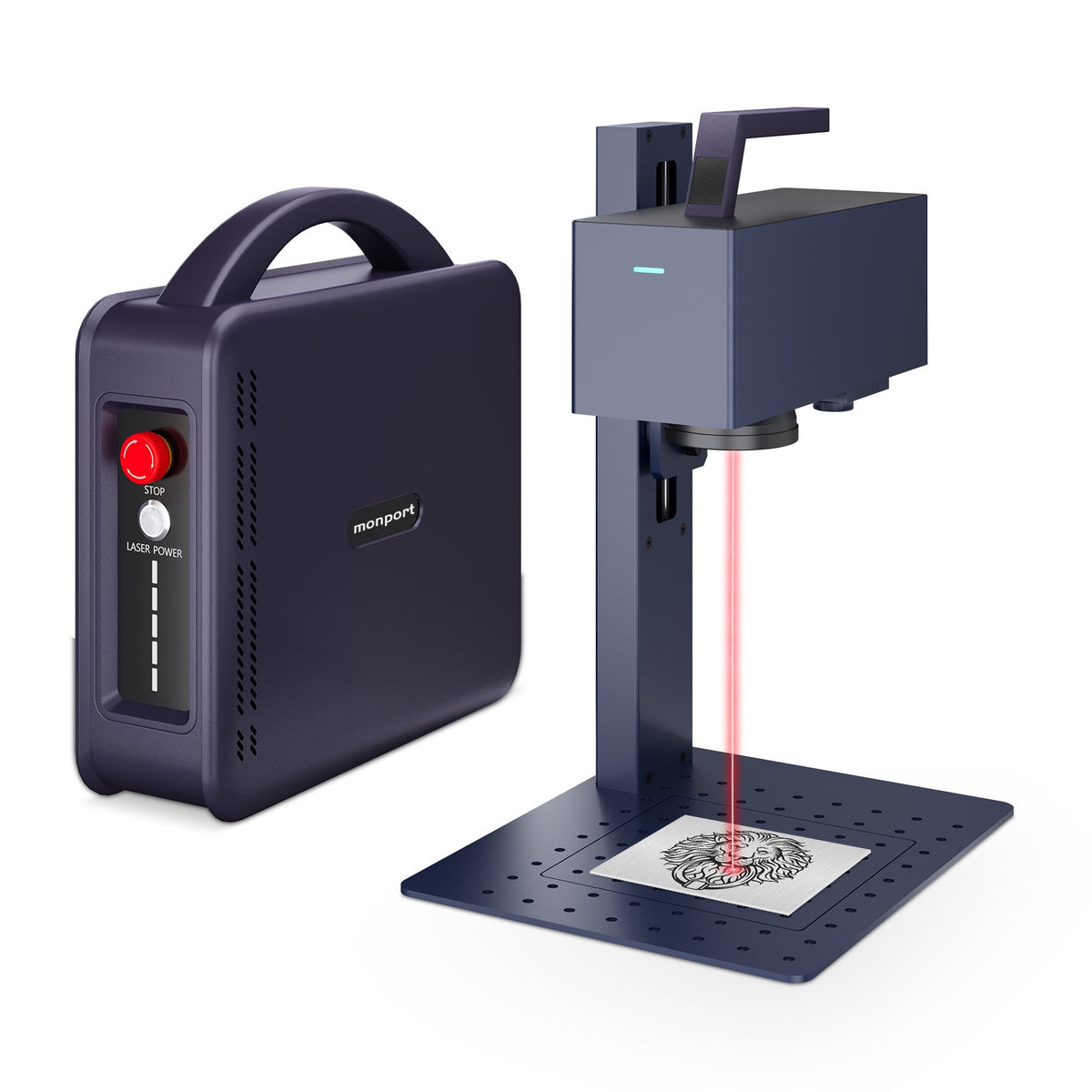
Monport 20W Portable Fiber Laser Engraver for Color Metal Marking-JP

What is a portable laser engraver, and how does it work?
A portable laser engraver uses a focused beam of light to create a mark on a suitable material. Depending on the machine and material, this can produce text, logos, serial numbers, patterns or decorative designs.
A portable laser engraver is useful when moving the workpiece to a standard engraving bed is inconvenient. For example, a repair business might need to mark a metal component that is too large or awkward to position on a small worktable.
A handheld fiber laser marking machine is designed to provide more flexible positioning, but handheld operation does not mean the laser is safe to use without proper controls. Follow the manufacturer's instructions and use the required protective equipment.
What should you look for when buying a portable metal laser engraver?

1. Laser power and marking performance
A machine's wattage is only one part of the decision. Marking speed, beam precision, material type, design complexity and the desired finish also affect the result.
For instance, a small business making metal tags may prioritise clear text and repeatable logos, while a maker creating decorative stainless-steel pieces may want to explore colour marking. Always test the intended material and finish before committing to a production run.
2. Working area and positioning
Check the marking area before buying. A smaller field may suit jewellery, tools and identification tags, while larger objects may require repositioning or a different setup.
A portable metal laser engraver can be helpful when an item is difficult to move, but confirm that the machine's design and instructions support your intended positioning. Do not assume every portable model can mark every surface or shape.
3. Software and computer compatibility
Software affects how easily you can create artwork, position designs and manage marking settings. Check the supported operating systems, connection requirements and included software before purchasing.
For Canadian buyers comparing a handheld laser marking machine Canada suppliers offer, compatibility can save frustration later. Confirm whether the machine supports your preferred design workflow and whether software licences or accessories cost extra.
4. Safety and long-term use
Laser marking requires careful handling. Look for clearly documented safety equipment, operating instructions, suitable protective enclosures and emergency controls.
Also check the manufacturer's stated service-life information, warranty and maintenance guidance. A claim about operating hours is not the same as a guarantee that every component will last for that entire period.
What projects can a handheld fibre laser marking machine handle?

A handheld fiber laser marking machine can be useful for small businesses, makers and workshops that want to personalise suitable materials. Possible projects include:
-
Business branding: logos on suitable metal products and tools.
-
Personalised gifts: names, dates and decorative designs on compatible items.
-
Product identification: labels, codes and serial numbers.
-
Creative metalwork: detailed patterns and, on supported materials, colour-marked designs.
-
Workshop jobs: marking suitable components that are inconvenient to move.
Results depend on the material, its surface finish and the machine settings. Not every plastic or stone is suitable, so check material compatibility and safety guidance before processing an unfamiliar item.
Is the Monport 20W portable fibre laser engraver worth considering?

For buyers exploring a portable laser engraver Canada option, the Monport 20W Portable Fiber Laser Engraver is designed for detailed metal marking and colour engraving. It may be worth comparing if you want to create personalised items or add markings to suitable materials without investing in a larger industrial setup.
The supplied specifications list 20W laser power, 0.01 mm engraving precision and marking speeds of up to 15,000 mm/s. The product information also describes colour marking and 3D relief engraving, with compatibility for metal, plastic and stone, subject to material suitability.
The machine supports Windows, macOS and Linux. The supplied product information also lists protective goggles, a protective cover and an emergency stop button; confirm the included accessories and required safety arrangements for your chosen configuration before use.
For a small Canadian business producing metal tags, for example, the combination of detailed marking and a portable format may be useful when planning custom orders. However, the right portable metal laser engraver still depends on the materials you work with, your expected production volume and the type of finish your customers want.
How do you choose the right machine for your needs?
Before purchasing a fiber laser engraver Canada buyers can order online, write down three things: the materials you plan to mark, the largest item you need to handle and the finish you want to achieve. This simple checklist can help you compare machines based on real projects rather than headline specifications.
Ask the seller about software licensing, warranty coverage, delivery, technical support and safety requirements in Canada. If you expect to mark curved or unusually shaped items, confirm the supported setup instead of assuming every handheld laser marking machine Canada option will accommodate them.
Key Takeaways
-
A portable laser engraver can offer flexible positioning for suitable marking projects.
-
A handheld fiber laser marking machine may suit workshops, makers and businesses handling awkwardly positioned items.
-
Check materials, marking area, software compatibility and safety arrangements before buying a portable metal laser engraver.
-
The Monport 20W model lists 0.01 mm precision and speeds up to 15,000 mm/s; actual results depend on the job and material.
-
Compare the complete setup, not just wattage, when choosing a fiber laser engraver Canada customers can use for their projects.
Conclusion
Choosing a portable laser engraver Canada buyers can rely on starts with understanding the work they need to do. A portable laser engraver should match your materials and workspace, while a handheld fiber laser marking machine should offer the positioning flexibility your projects require.
Before choosing a portable metal laser engraver, check its performance specifications, software compatibility and safety requirements. Compare each handheld laser marking machine Canada option carefully, and consider whether a fiber laser engraver Canada supplier can provide the guidance and support you need.
The Monport 20W portable model is one option to explore for detailed metal marking and colour engraving. Explore the Monport Canada range to compare available equipment and find a setup that fits your intended projects.
Frequently Asked Questions
What is the best portable laser engraver for metal?
The best option depends on your material, required marking depth, design size and budget. Compare specifications and confirm that the machine supports your intended application.
Can a handheld fibre laser engrave stainless steel?
Suitable fibre laser machines can mark stainless steel. The appearance and depth depend on the laser, settings, material grade and surface finish.
What can a portable metal laser engraver mark?
Depending on the model, compatible materials may include metals and certain plastics or stones. Always confirm material suitability and safety requirements with the manufacturer.
Is a handheld laser marking machine suitable for a small business?
It can suit businesses making personalised products, metal tags or identification marks. Consider production volume, workflow, training and safety before purchasing.
What should I check before buying a fibre laser engraver in Canada?
Check the supported materials, marking area, software, electrical requirements, included safety equipment, warranty and local support. Confirm the details with the seller before ordering.


