






Choosing the best home laser cutter for a small workspace comes down to more than laser power. You need to consider the machine's footprint, the materials you want to work with, ventilation, safety requirements and the room available for accessories and finished projects.
The right home laser cutter machine can help hobbyists, DIY enthusiasts and small-business owners create personalised gifts, signs, labels and decorative products without dedicating an entire room to production. However, not every laser is designed for the same materials or working environment.
Before investing in the best home laser cutter, work out what you plan to make and measure your available space. This guide explains the main machine types, how power affects performance and what to consider when comparing options, including compact Monport equipment.
What Should You Look for in a Home Laser Cutter Machine?

Start with three essentials: workspace, material compatibility and the type of projects you expect to produce. A compact machine may be a sensible choice for occasional crafting, while a small business producing larger batches may need more working area and a faster workflow.
Measure Your Available Space
Don't measure only the machine itself. Allow room for ventilation equipment, electrical connections, material storage, maintenance and safe access around the machine.
A garage workbench, spare-room studio or dedicated craft corner can each have different limitations. Check the manufacturer's clearance requirements and make sure your proposed location meets its ventilation and fire-safety instructions.
Match the Laser Type to Your Materials
Different laser technologies are designed for different jobs.
-
CO₂ lasers: Commonly used for engraving and cutting suitable non-metal materials, including wood, acrylic and selected paper products.
-
Diode lasers: Often chosen for hobby projects and lighter-duty engraving or cutting, depending on the material and machine power.
-
Fibre lasers: Primarily used for marking and engraving metals and certain other compatible materials.
If you mainly want to make wooden ornaments, acrylic signs or layered decorations, a suitable CO₂ or diode model may be more relevant than a fibre laser. If your products involve metal tags, tools or stainless-steel accessories, a fibre marking machine may be a better fit.
The best home laser cutter is therefore the one suited to your actual materials, rather than simply the machine with the highest advertised wattage.
How Much Laser Power Do You Need?

Laser power influences how a machine processes a material, but the result also depends on the laser type, material thickness, focus, speed and number of passes.
For a home laser cutter machine, don't assume a higher wattage automatically means better results. A machine designed for metal marking, for example, may not cut wood or acrylic at all, regardless of how powerful it appears on paper.
Think About Your Projects First
Here are some examples to help narrow down your options:
|
Project |
What to prioritise |
|---|---|
|
Wooden keychains and ornaments |
Fine engraving, suitable cutting capability and a manageable work area |
|
Personalised wooden signs |
Engraving quality and enough space for your design |
|
Acrylic nameplates |
Compatibility with the specific acrylic and laser type |
|
Metal business cards and tags |
Fibre laser marking capability |
|
Small-batch personalised products |
Repeatable results, convenient focusing and an efficient workflow |
For anyone comparing the best home laser cutter, this distinction matters: engraving is not the same as cutting. Engraving marks or removes material from its surface, while cutting must pass through the material.
Which Features Matter Most in a Small Workspace?

Working Area and Machine Size
A smaller working area can be perfectly adequate for jewellery tags, small signs and personalised accessories. Larger projects may require a bigger machine or several carefully planned passes, depending on the equipment and material.
Consider the size of your most common product, not just the occasional oversized project. A compact home laser cutter machine is useful only if it can accommodate the items you intend to make.
Focusing and Software
Focusing determines where the laser beam is concentrated on the workpiece. Autofocus can simplify setup, while compatible design software helps you prepare artwork, position designs and manage marking or cutting jobs.
Check software compatibility with your computer before buying. Also confirm whether the machine supports the file formats and workflow you already use.
Ventilation and Safety
Laser processing can produce smoke, fumes and particles, depending on the material. Use the manufacturer's recommended enclosure, extraction and protective equipment, and never process materials that the manufacturer has not approved.
Some plastics release hazardous fumes when processed. Even in a small home workshop, ventilation and fire precautions are essential rather than optional extras.
Is the Monport GM Pro 30W Suitable for Home Projects?
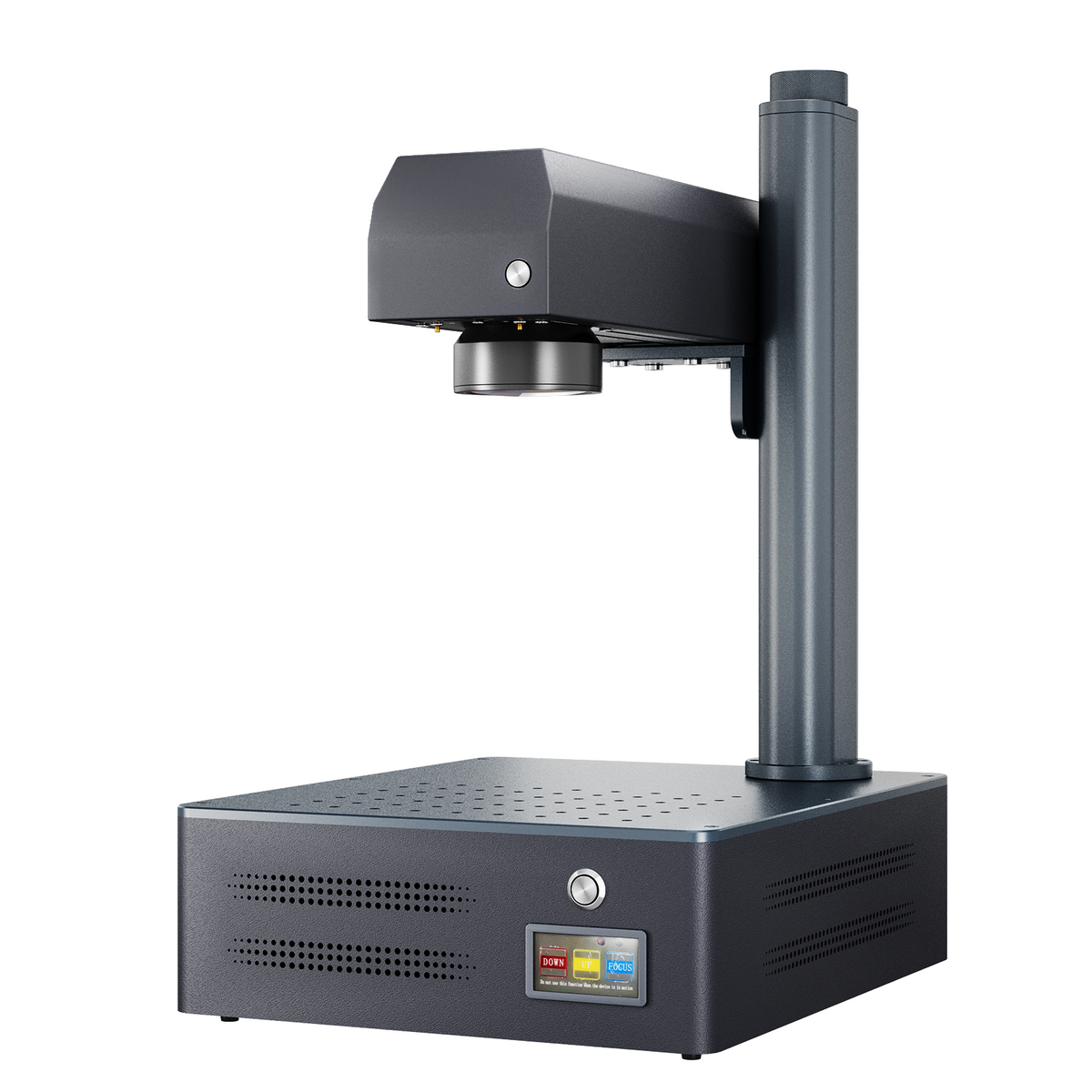
Monport GM 30W Pro Integrated JPT MOPA Fiber Laser Engraver & Marking Machine with AutoFocus

The Monport GM Pro 30W uses a MAX laser source and is designed for engraving and marking compatible materials. It may suit a small workshop producing metal tags, engraved accessories and other detailed marking projects.
However, it's important to understand the distinction: this is a fibre laser engraving and marking machine, not a general-purpose home laser cutter for wooden or acrylic projects. Its specifications should not be confused with those of a CO₂ or diode cutting machine.
Monport GM Pro 30W — supplied specifications
|
Specification |
Details |
|---|---|
|
Laser power |
30W |
|
Laser source |
MAX |
|
Engraving area |
150 × 150 mm (5.9 × 5.9 in) |
|
Maximum engraving speed |
10,000 mm/s (393.7 ips) |
|
Engraving accuracy |
0.01 mm |
|
Maximum marking depth |
0.08 mm (0.003 in) |
|
Focus mode |
Autofocus |
|
Pulse width |
80–120 ns, unadjustable |
|
Frequency range |
30–60 kHz |
|
Compatible materials |
Metals, hard plastic, titanium, gold, silver and steel, subject to compatibility |
|
Software |
BslAppSimple and LightBurn |
|
Operating systems |
Windows and macOS |
|
Cooling |
Air cooling |
|
Product dimensions |
40 × 33 × 62 cm (15.75 × 13.00 × 24.41 in) |
|
Product weight |
17.1 kg (37.7 lb) |
|
Input power |
110–120V, 60Hz |
|
Warranty |
2 years; 1 year for the laser source |
The one-touch autofocus feature can make setup more convenient, while the 150 × 150 mm work area is suited to relatively small items. Rotary axis support also allows compatible cylindrical objects to be marked with the appropriate setup.
Its stated maximum speed is not a guarantee that every design will finish at that speed, and its maximum marking depth is not a cutting-depth rating. The machine also does not support colour engraving according to the supplied specifications.
If your main goal is cutting wooden crafts at home, compare suitable CO₂ or diode machines instead. If you want to add detailed metal engraving to a small business, the GM Pro 30W is a more relevant option to investigate.
How Can You Choose the Best Machine for Your Budget?

The purchase price is only one part of the cost. Include ventilation, compatible materials, maintenance, replacement parts and any accessories needed for your intended projects.
A home laser cutter machine may be a worthwhile investment if you regularly make products that would otherwise take considerable time to produce by hand. Before buying, compare machines based on their actual cutting or marking capabilities, usable work area and ongoing operating requirements.
For small businesses, start with a manageable product range. Wooden coasters, ornaments and engraved metal tags are examples of product categories to research, but the machine must be compatible with the material and intended process.
Key Takeaways
-
Choose the best home laser cutter according to your materials, workspace and project requirements.
-
Measure the complete setup, including ventilation and safety equipment.
-
Compare laser technology before comparing wattage.
-
Confirm whether you need engraving, cutting or both.
-
The Monport GM Pro 30W is designed for compatible engraving and marking applications, not general-purpose wood cutting.
-
A suitable home laser cutter machine should match your real production needs rather than offer features you won't use.
Conclusion
Finding the best home laser cutter starts with understanding what you want to create. For wooden decorations, signs and craft projects, look for a suitable cutting machine with an appropriate work area and reliable safety provisions. For metal tags and personalised metal products, a fibre marking system may be a better choice.
The best home laser cutter isn't necessarily the most powerful or expensive option. It is the machine that fits your workspace, materials and budget while allowing you to produce consistent results.
Before choosing a home laser cutter machine, check the dimensions, material compatibility, software and ventilation requirements. A well-matched home laser cutter machine can help you make personalised gifts, test new product ideas and develop a small creative business.
If your plans centre on metal engraving, the Monport GM Pro 30W offers autofocus, a 150 × 150 mm marking area and a stated maximum engraving speed of 10,000 mm/s. If you want to cut wood or acrylic, investigate a compatible CO₂ or diode system instead.
Ultimately, the best home laser cutter is the one that suits your projects today and your realistic plans for tomorrow. Choose your home laser cutter machine carefully, prioritise safety, and start with manageable projects before expanding your range.
Ready to plan your workspace? List your intended materials, measure your available area and compare compatible Monport laser options to find equipment that fits your creative goals.
Frequently Asked Questions
1. What is the best home laser cutter for small spaces?
The best home laser cutter depends on your materials and project sizes. Compare compact diode and CO₂ machines for suitable craft-cutting projects, and fibre systems for compatible metal marking.
2. How much space does a home laser cutter machine need?
Measure the machine and allow additional room for ventilation, electrical connections, maintenance and safe operation. Follow the manufacturer's specified clearance requirements.
3. Can a home laser cutter cut wood and acrylic?
Some CO₂ and diode machines can cut suitable wood and acrylic within their rated capabilities. Fibre marking machines, such as the Monport GM Pro 30W, are designed for different applications and should not be assumed to cut these materials.
4. Is a higher-wattage laser cutter always better?
No. The right power depends on the laser technology, material, thickness and intended result. Higher wattage alone does not guarantee better cutting quality or suitability for every material.
5. Is a home laser cutter machine worth buying for a small business?
It can be worthwhile if your expected sales, production needs and available workspace justify the investment. Compare the full setup cost, material compatibility, safety requirements and ongoing maintenance before purchasing.


